The safest way to find who doesn't follow you back on Instagram!
Using third-party apps that ask you to log in through them? Big mistake! Instagram's algorithm flags this as suspicious activity and could instantly suspend your account without warning.


Features
Nonfollowers
Find out who doesn't follow you back.

Unlimited Uploads
Check your results as many times as you want.
Unfollowers
Find out who has unfollowed you, even if you don't follow them back.
Blocked or Removed
Track who has blocked or removed you.
Very First Follower
Discover who has been following you the longest.
How it works?
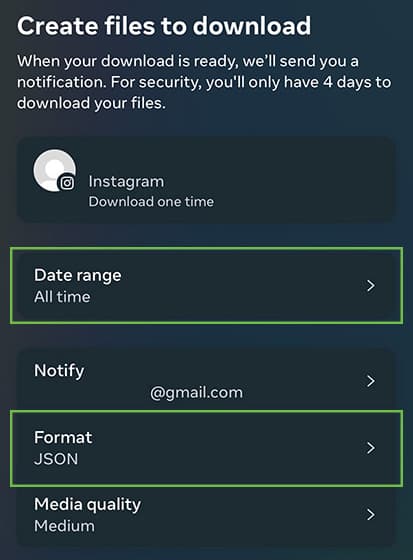
1. Export Data
2. Upload Data
3. Get Results
A safe Instagram unfollowers and follower tracker
Nonfollowers does more than find who doesn't follow you back. It also works as a safe Instagram unfollowers tracker, showing exactly who unfollowed you — without ever asking for your password or putting your account at risk.
Because you can re-upload a fresh Instagram data export whenever you like, you can use Nonfollowers as an Instagram follower tracker to monitor how your followers change over time, catch unfollowers, and see who blocked or removed you.
Every feature works the same safe way: you upload your own Instagram data export instead of handing over your password. That's what makes it the safest way to track your Instagram followers and unfollowers without risking a ban or suspension.
FAQs
Nonfollowers is the safest way to find the people who don't follow you back. Unlike third-party apps, you will never risk your account from getting banned, suspended, or hacked.
No. Instagram has no list of the accounts you follow that don't follow you back. Nonfollowers gives you that list from your Instagram data export, without ever asking for your password.
Yes, we are working to add more features to Nonfollowers continuously. Update Nonfollowers app regularly to get the new feature when it's released.
Yes, we do have both iOS and Android apps.
Yes, Nonfollowers should work on all devices. However, we recommend using devices launched in the last 3-4 years to get the best experience.
In case you see someone on the list that actually follows you back, this means you missed the very important step where you have to specify 'All time' for Date range.
Yes, you can contact us through our Contact page. Please let us know if you have any questions.